 EarlyApply
You search for a job on LinkedIn and the same results keep coming back. The "Sort by: Most recent" menu you used to have is gone. That is not you: it is LinkedIn's new AI-powered job search, and it is built to rank by relevance, not by date.
Why LinkedIn's new job search hides fresh jobs
- No sort menu. The new search lives at
linkedin.com/jobs/search-results/. It has no Most recent option, and we found no address code that adds one. We testedsortBy=DDin November 2026: it changed nothing. - The time filter is rounded up. Ask for the last hour (
f_TPR=r3600) and you get the 24-hour list. See jobs posted in the last hour. - Fresh jobs are spread out. In one of our tests, 9 jobs under one hour old were scattered over the first 200 results of a 24-hour search. Only 1 of them was on page 1 (25 jobs per page). The rest were on pages 2 to 8.
That matters because the first applicants get seen first. A job you find after a day is often a job with hundreds of applicants.
The fix: ★ Newest jobs
EarlyApply is a free Chrome and Edge extension. On LinkedIn's new search it adds a ★ Newest jobs button to the bar above your results.
-
Search on LinkedIn as usual
Type your job title and place. Stay signed in.
-
Pick how fresh
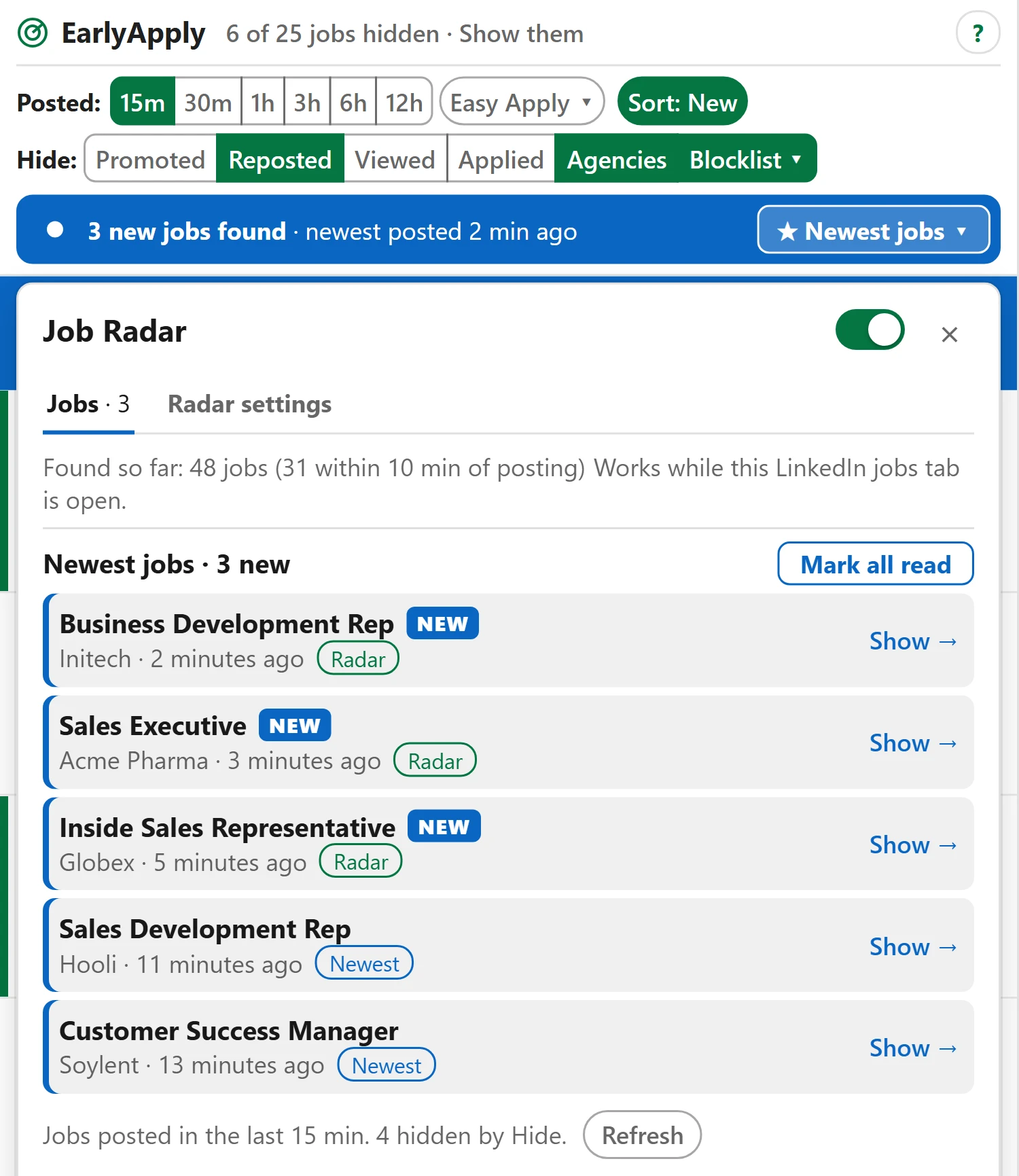
Use the time buttons in the EarlyApply bar: 15m, 30m, 1h, 3h, 6h or 12h.
-
Click ★ Newest jobs
A list opens beside your results with your search, newest first: the title, the company and how many minutes ago it was posted. Click Show and the job opens on the same page, so you never lose your place.
-
Refresh or let Radar watch
Press Refresh to ask again. Or switch on Job Radar and get a desktop alert when a new job appears.
How it works, and what it does not do
- Where the list comes from. EarlyApply asks LinkedIn's public job list (the one anyone can open without signing in) for your search, sorted by newest. Your search words go to LinkedIn only, like a normal search. Nothing goes to EarlyApply: it has no account and no server.
- What carries over. Your keywords, location, distance, remote or on-site, Easy Apply, experience level, job type and company. The AI filter pills of the new search are not carried over.
- Up to 50 jobs. It shows the 50 newest that match, for the time you picked (15 minutes to 12 hours).
- It does not hide promoted or reposted jobs. LinkedIn's public list does not label them. Read the "posted X ago" line, or use the Hide buttons on the results page.
- LinkedIn can pause the list. Now and then LinkedIn stops returning new jobs to this public list for 30 minutes or more. When that happens, use the normal results and Radar, and try again later.
- EarlyApply never applies for you. It does not fill in, click or submit anything. You apply yourself.
See your LinkedIn search newest first
EarlyApply works while you are logged in, right on the LinkedIn page.
- ★ Newest jobs: the fresh jobs the AI search buries
- Time buttons: 15m, 30m, 1h, 3h, 6h, 12h
- Job Radar: a desktop alert when a new job is posted
Questions
Why can't I sort LinkedIn jobs by most recent?
LinkedIn's new AI-powered job search (the /jobs/search-results/ page) shows results by relevance and has no Most recent option. The older classic search had a sort menu. When LinkedIn moves your account to the new search, the menu is gone.
Does sortBy=DD work on the new LinkedIn job search?
No. We tested it in November 2026 and it changed nothing: the new search ignores sort codes in the address.
How do I see the newest LinkedIn jobs on the new search?
Install the free EarlyApply extension for Chrome or Edge and click the ★ Newest jobs button in its bar on your LinkedIn search. It lists the same search newest first, from LinkedIn's public job list, up to 50 jobs from the last 15 minutes to 12 hours.
Does the Newest jobs list hide promoted or reposted jobs?
No. LinkedIn's public list does not label promoted or reposted jobs, so EarlyApply cannot tell them apart there. Check the posted-time line on each job before you apply.
Which of my filters carry over to the Newest jobs list?
Your keywords, location, distance, remote or on-site, Easy Apply, experience level, job type and company. The AI filter pills of the new search are not carried over.
Does EarlyApply send my searches to its own server?
No. The list is requested from LinkedIn only, using your search words, like a normal search. EarlyApply has no account and no server, and it never applies for you.
Can I get the old LinkedIn job search back?
Not reliably: LinkedIn is retiring it. Our guide on classic job search shows what still works.